The 13th National Parliamentary Election is finally here. With the voting scheduled for February 12, 2026, millions of citizens across Bangladesh are gearing up to exercise their democratic right. Whether you are a first-time voter or a seasoned participant in the democratic process, one question remains paramount on the eve of the election: “Where is my polling station?”
Finding your designated polling center before election morning is crucial. In the past, voters often had to rely on slips of paper distributed by local candidates or scan long lists pasted on school walls. Today, thanks to the Bangladesh Election Commission’s (BEC) digital initiatives, you can find your voting center from the comfort of your home.
If you are searching for how to check polling station in Bangladesh 2026, this step-by-step guide will help you instantly. How to use the official ecs.gov.bd portal, the “Smart Election Management BD” app, and SMS services to locate your polling station instantly is also be described here.
Quick Summary:
Voting starts at 7:30 AM on February 12, 2026. Check your center now before it’s too late.
- Website: ecs.gov.bd
- SMS: PC NID → 105
- App: Smart Election Management BD

How to Check Polling Station in Bangladesh 2026
Before we dive into the “How to Check Polling Station in Bangladesh 2026,” let’s understand the urgency.
- Avoid Confusion: Polling centers often change between elections. Just because you voted at the local high school in 2024 doesn’t mean your center is the same in 2026.
- Save Time: The voting hours for the 2026 election have been adjusted to 7:30 AM to 4:30 PM. Knowing your exact location helps you plan your day and avoid wandering between centers.
- Verify Your Status: Checking your center also confirms that your name is active on the voter list. If the system returns your data, you are good to go.
Method 1: The Official Website (ecs.gov.bd)
The most reliable source of information is the Bangladesh Election Commission’s official website. This method is best for users on a desktop or those who want to see the full list of centers in their area.
Link: https://ecs.gov.bd/polling-station
Step-by-Step Guide:
- Visit the Portal: Open your browser and navigate to the link above. If the direct link is heavy due to traffic, go to
www.ecs.gov.bdand look for the “Polling Station” or “Vote Center” menu on the navigation bar.
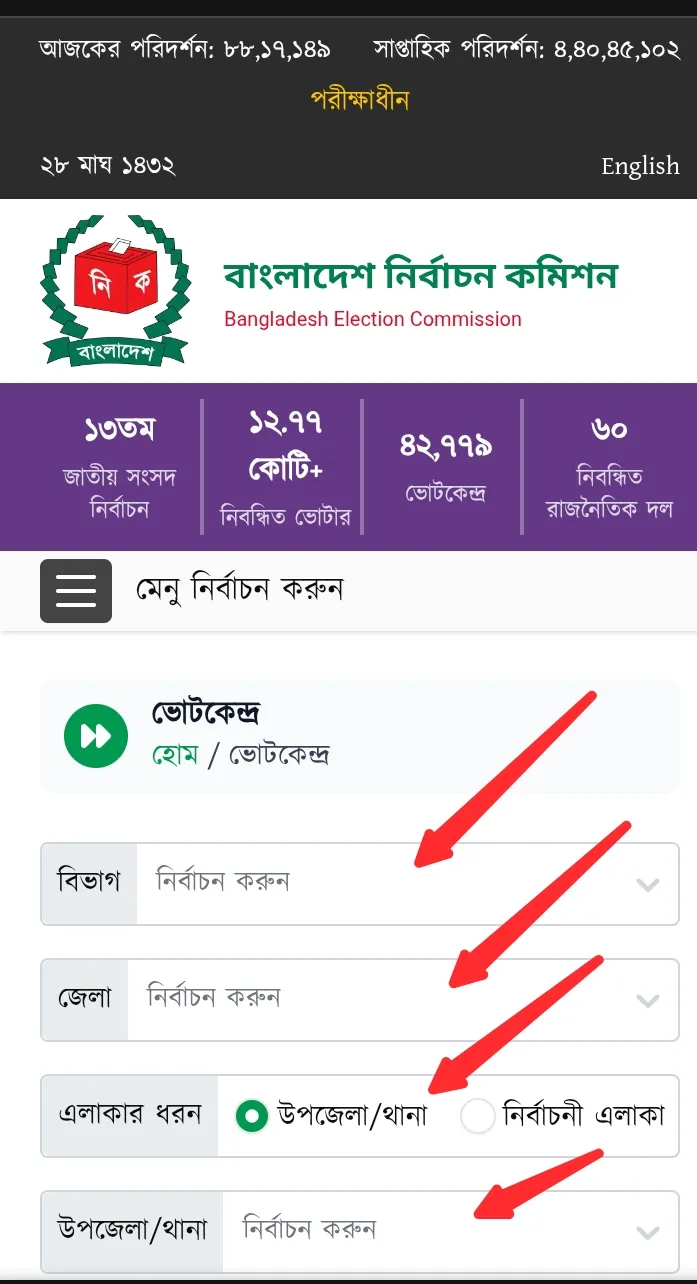
- Choose Your Search Method: The website typically offers two ways to search:
- Search by NID: This is the most specific method. You will need to enter your National ID (NID) number (either the smart card number or the old 13/17 digit number) and your Date of Birth.
- Search by Location: If you want to see the list of all centers in your area, you can select your Division, District, Constituency (e.g., Dhaka-10), and Upazila/Thana.
- Enter Captcha: For security reasons, you may be asked to solve a simple math problem or enter a captcha code.
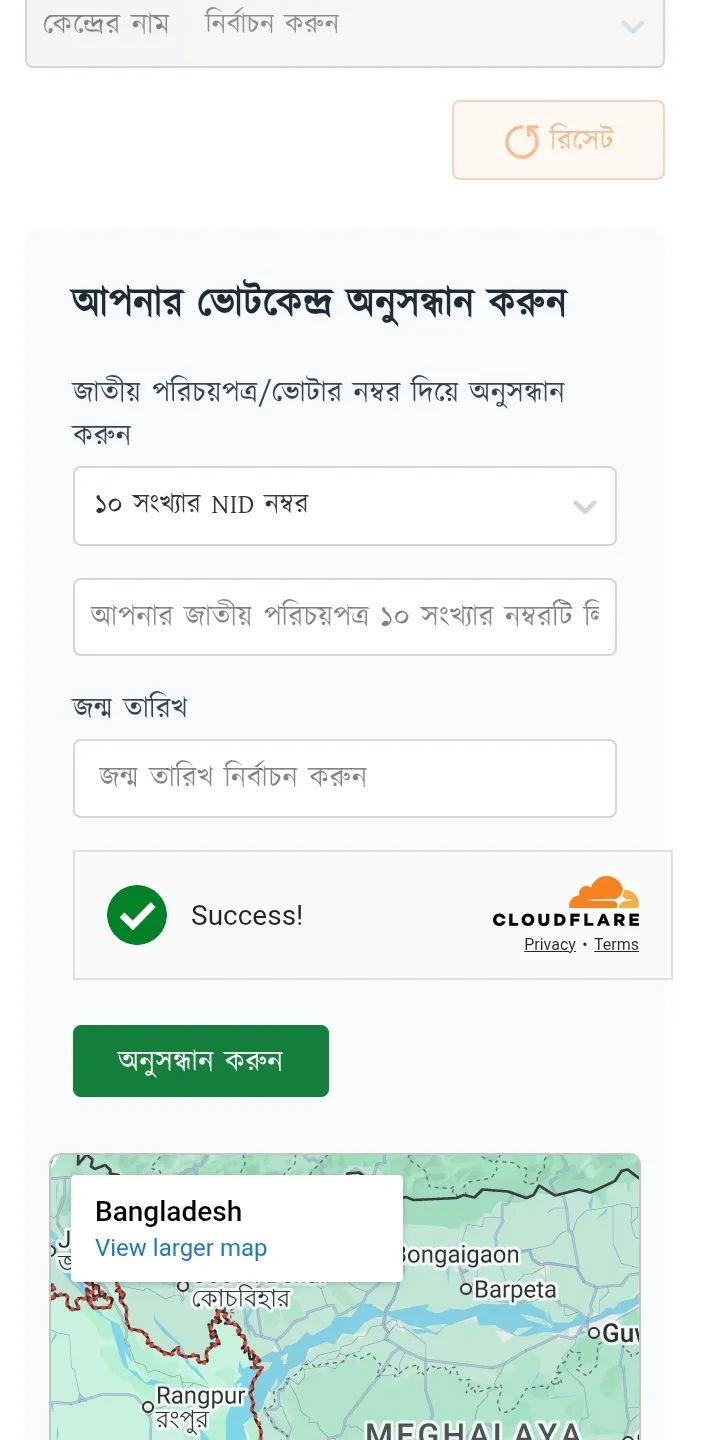
- View Results: Click “Search.” The system will display:
- Your Voter Number
- Serial Number (This is very helpful to tell the polling officers to find your name quickly in the book).
- Polling Station Name (e.g., “Mirpur Govt. High School, Northern Building”).
- Google Maps Location (in some updated interfaces).
Pro Tip: Take a screenshot of this result. You won’t be able to access the internet inside the voting booth, but having the screenshot helps you locate the room number at the center.
Method 2: Smart Election Management BD App
For smartphone users, the Smart Election Management BD app is a game-changer. Launched to facilitate the 2026 elections, this app provides a user-friendly interface. You can also verify your voter status online through the official portal.
- Download: Go to the Google Play Store or Apple App Store and search for “Smart Election Management BD”.
- Install & Open: Install the app. You might need to select your language (Bangla/English).
- Navigate: On the home screen, look for the banner or button that says “Find Polling Station” or “Voter Information”.
- Input Data: Enter your NID number and Date of Birth.
- Get Directions: The unique feature of this app is that it often integrates with maps to show you the distance and direction from your current location to the polling center.
Note: Ensure you have a stable internet connection as the app pulls real-time data from the EC server.
Method 3: The SMS Service (No Internet Required)
If you don’t have a smartphone or data connection, don’t worry. The Election Commission has a robust SMS system. This is often the fastest way when the servers are overloaded.
The Shortcode: 105
How to Send the SMS:
- Go to your mobile phone’s message option.
- Type: PC
<space>NID Number - Send it to 105.
Example:
If your NID number is 1234567890, type:
PC 1234567890
The Reply:
Within a few seconds, you will receive a return SMS from 105 containing:
- Name: [Your Name]
- Voter No: [Your Voter Number]
- Center: [Name of the School/Institute]
- Serial: [Your Serial Number]
Important: Standard SMS charges may apply unless the EC has waived them for election days.
Method 4: The Hotline (Call 105)
If you are facing issues with your NID number or the SMS service isn’t working, you can speak to a human operator.
- Dial: 105
- Instructions: Listen to the IVR menu. Usually, you need to press 9 to speak to a representative.
- Hours: The hotline is active from 6:00 AM to 12:00 Midnight daily during the election period.
Have your NID number ready before you call, as the agent will ask for it immediately.
Understanding Your Result Data
When you find your information, you will see a few technical terms. Here is what they mean and why they matter:
| Term | Meaning | Why it matters |
|---|---|---|
| Voter Area | The specific locality where you are registered. | Determines which local councilor you vote for. |
| Voter No | Your unique registration number in the voter list. | Essential for official identification. |
| Serial No | Your sequence number in the printed book at the center. | Memorize this. Telling the polling officer your serial number saves them minutes of searching, speeding up the queue. |
| Center Name | The building where you will vote. | Often schools or madrasas. Double-check if it specifies “Male” or “Female” sections. |
Troubleshooting: “No Record Found”
It can be panic-inducing to see “No Record Found” or “Invalid NID” just hours before the election. Here is what might be happening:
- Smart Card vs. Old NID: If you have a Smart NID (10 digits), try using that. If you only have the old laminated card (13 or 17 digits), try that. Sometimes the database expects the 17-digit format (if you have 13 digits, add your birth year in front, e.g., 1990+13digits).
- New Voters (2025-2026): If you registered recently (after the 2024 update), ensure you are using the NID number provided on your registration slip if you haven’t received the card yet.
- Server Overload: With 127 million voters potentially checking at once, the
ecs.gov.bdsite might crash. If it fails, switch to the SMS method immediately.
Election Day Guidelines: February 12, 2026
Once you have your location, here is a quick checklist for the big day:
- Time: Voting runs from 7:30 AM to 4:30 PM. The EC has extended the time by one hour this year to accommodate the referendum and parliamentary ballots.
- Documents: While your fingerprint is your primary ID, carrying your National ID (NID) card is highly recommended to speed up the verification process. If you don’t have the smart card, the laminated one or even the registration slip works.
- Prohibited Items: You cannot carry mobile phones, cameras, or lighters inside the polling booth. Leave them at home or with a friend outside.
- Transport: Remember that vehicular movement is restricted on election day. Pick a center close to you or be prepared to walk/take a rickshaw.
Frequently Asked Questions (FAQ)
Q: Can I vote at any polling station in my city?
A: No. You can only vote at the specific polling station assigned to your voter ID. Your name will not appear on the list at any other center.
Q: I lost my NID card. Can I still vote?
A: Yes. If your name is on the voter list and your biometric (fingerprint/iris) matches, you can vote. However, knowing your Voter Number or Serial Number (using the methods above) is essential to prove your identity without the card.
Q: The website shows my old address. What do I do?
A: If the website shows your old address, it means your voter transfer was not completed or updated in time for this election. You must go to the polling station listed on the website to cast your vote; you cannot vote at your new location.
Q: Is the SMS service free?
A: Usually, standard SMS charges apply. However, checking via the app or website is free (excluding data costs).
Conclusion
The 2026 General Election is a pivotal moment for Bangladesh. The Election Commission has made significant strides in digitizing the process to ensure that every voter can access their information easily. Whether you use the ecs.gov.bd/polling-station link, the mobile app, or the SMS service, the key is to check today.
Do not wait until you are standing in a queue to realize you are at the wrong school. Take five minutes now, verify your center, save your Serial Number, and go cast your vote with confidence.
Happy Voting, Bangladesh!
Disclaimer: This guide is based on the latest information available from the Bangladesh Election Commission as of February 2026. For official updates, always refer to www.ecs.gov.bd.